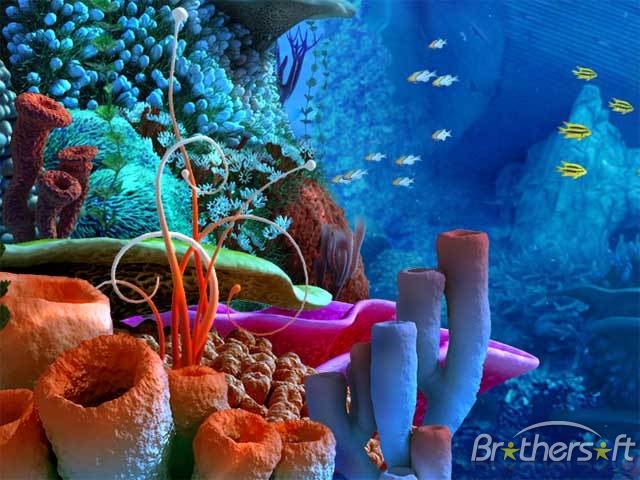
These are screen shots from my final code. I a very happy with how it has turned out, I like that it is simple but still engaging and has a very distinct fun/cute vibe to it that attracts the audience to play.
As a whole I think the combination of the simplicity of the interactions, the sound effects, graphics and ideas behind my game create a fun, very easy to use and highly highly addictive application which is exactly the kind of results I was looking to get out of my game.
In one of the first lectures we were asked to consider what the user will learn from our game and if it will still be fun to use once they have learnt it or does it quickly become repetitive and boring? I constantly asked myself this throughout the designing process to make sure that my game kept the user entertained for more than ten seconds.
I think that although it comes clear quite quickly everything my game has to offer, the variation in the interaction (never knowing when they will pop back to full size or what direction the critters will go in) and the fact that it is impossible to get them all small at the same time keeps the user entertained and addicted and it is easy to become mesmerized and keep playing without even really realizing!
Showing posts with label DSDN142. Show all posts
Thursday, 18 October 2012
Monday, 15 October 2012
Adding Sound
I think because I have minimized the amount of interactions, adding sound as an extra element would be perfect in creating the fun, silly theme I have for my game.
To apply to my underwater theme the sounds I have chosen are a background noise of a sort of submerged recording of lots of bubbles that will play quietly and constantly in my code to set the deep sea mood.
This is the source of the sound I am thinking about using:
http://www.freesound.org/people/digifishmusic/sounds/45521/
The other sound I want to use is to emphasize my main interaction which is the shrinking and re growing of the sea critters. To do this I want to incorporate a cute bubble popping kind of noise for when the critters pop back to full size.
Source to the sound I think I will use:
http://www.freesound.org/people/BMacZero/sounds/96125/
Hopefully sound will give more life to my application and my characters.
To apply to my underwater theme the sounds I have chosen are a background noise of a sort of submerged recording of lots of bubbles that will play quietly and constantly in my code to set the deep sea mood.
This is the source of the sound I am thinking about using:
http://www.freesound.org/people/digifishmusic/sounds/45521/
The other sound I want to use is to emphasize my main interaction which is the shrinking and re growing of the sea critters. To do this I want to incorporate a cute bubble popping kind of noise for when the critters pop back to full size.
Source to the sound I think I will use:
http://www.freesound.org/people/BMacZero/sounds/96125/
Hopefully sound will give more life to my application and my characters.
Monday, 1 October 2012
Adding Background
Finally got around to adding a photo background into my game, I had already decided on a underwater photo so all I had to do was import it into my code. This turned out to be more difficult that I thought as once the image was in the screen it froze up all the interaction for some reason however managed to get it fixed and love the way it looks, i think having a photo rather than a blue screen really brings about a much more realistic and interesting setting for my game to fill my under the sea aesthetic.
Sunday, 30 September 2012
Final Colour Schemes/ Colour effects
I wanted to try and make it so when the critters popped back to full shape they would change colour however I couldnt get the timing right on my code so instead the colours change randomly every so often.
I actually prefer this as it is much more subtle so it takes awhile for the user to realize that it is happening but it make the critters have a bit more life of there own and stops them from being so static.
I then had to decide on the colour scheme of my code. Originally I wanted to stick to 5 or 6 bright coral colours however by adding the random changing colour element it meant that I ended up getting heaps of colours i didn't want because I had no control over what random colours were selected.
This is a screen shot of when I made the colour range values from 0 to 255 on all RGB meaning there 'random' function had free range to create any colour:
I actually prefer this as it is much more subtle so it takes awhile for the user to realize that it is happening but it make the critters have a bit more life of there own and stops them from being so static.
I then had to decide on the colour scheme of my code. Originally I wanted to stick to 5 or 6 bright coral colours however by adding the random changing colour element it meant that I ended up getting heaps of colours i didn't want because I had no control over what random colours were selected.
This is a screen shot of when I made the colour range values from 0 to 255 on all RGB meaning there 'random' function had free range to create any colour:
Although I do like that the colours emphasize the cartoon like features of my game, i wanted my application to have more of a theme and not seem so random, I thought that this made the features seem less linked.
To fix this I changed my code to a greeney/blue colour scheme that still allowed for a lot of variation but kept to the underwater critters effect from my original idea.
This is the kind of colours that are produced :
I like the way these critters seem to sync with the background and appear to have more of a purpose.
Friday, 28 September 2012
Interim Reflection
The main feedback I got from the interim presentation was to make sure I was very critical when its comes to finalizing and refining my work. Because I have so many interactions planned for my final piece I think I will find that many will change or be left behind as I go depending on how effective each one is and what it brings to the game. I have put in a lot of ideas for interactions my game has, however sometimes simple is effective. Overall, my idea seemed to get a good response, i think the 'cute' cartoon factor i proposed is what made it most unique and will be a feature I need to maintain in my final.
Thursday, 27 September 2012
Where to Next?
What will make my application FUN TO USE?
To try and make my app stand out, grab the audiences attention and maintain it I am incorportating a lot of different interactions. Although most of them are very simple because there are so many it should take the user some time to work them all out, plus the user will then want to try out certain actions again and again (eg. exploding one of the sea critters to make lots of little ones) which will keep them enteratined.
The life given to the critters as well should add to the fun element by creating a cute cartoony app has a lot of visual elements such as bright colours for the benefit of the user plain gemoetric shapes and colours, this way it also gives the interactions more meaning. Ie. without the critters there would seem to be no purpose to why they shy away from the mouse.
Next Steps....
Will be to work out how to put a timer on the sucked in critters to get them to randomly pop out again. Also to work out how to make all the circles different colours that possibly change when they bump into one another. Next step will be adding the running away from mouse effect I have on one circle to multiple circles. Once I have all of these effects down I want to start adding the characteristics to my critters; shape, eyes etc. Finally I want to add the shaking into exploding more critters effects to complete my coding.
As I do struggle with code, drawing up a step by step diagram of what to do will be the best option to get down exactly what needs to happen when and how.
To try and make my app stand out, grab the audiences attention and maintain it I am incorportating a lot of different interactions. Although most of them are very simple because there are so many it should take the user some time to work them all out, plus the user will then want to try out certain actions again and again (eg. exploding one of the sea critters to make lots of little ones) which will keep them enteratined.
The life given to the critters as well should add to the fun element by creating a cute cartoony app has a lot of visual elements such as bright colours for the benefit of the user plain gemoetric shapes and colours, this way it also gives the interactions more meaning. Ie. without the critters there would seem to be no purpose to why they shy away from the mouse.
Next Steps....
Will be to work out how to put a timer on the sucked in critters to get them to randomly pop out again. Also to work out how to make all the circles different colours that possibly change when they bump into one another. Next step will be adding the running away from mouse effect I have on one circle to multiple circles. Once I have all of these effects down I want to start adding the characteristics to my critters; shape, eyes etc. Finally I want to add the shaking into exploding more critters effects to complete my coding.
As I do struggle with code, drawing up a step by step diagram of what to do will be the best option to get down exactly what needs to happen when and how.
Digital Application (photoshop storyboard)
Below is an example of what I want my sea critters to look like at full size and when sucked in..

Below is a basic example and diagram of one of the interactions I hope to achieve...
Below is a digital photoshopped image of a hypothetical screen shot of my application.
In this shot I have tried to incude a visual representation of all the interactions I hope to occur. In the lower left hand area is an example of a critter that has just exploded because the user has shaken on of the critters, creating many new small critters.
The arrow in the bottom left corner represents the curser, the fact that no critters are near by represents how they are repealed by the cursor.
The other critters around the screen are examples of critters at full size and fully sucked it.
The different colours used also represet that the colour will change randomly to one of the 6 designated colours when they bump into each other.
The background used in this shot is the same picture I hope to use in my code, I think it is effective at bringing the critters to life, it gives them a habitat.
Colour Scheme and Background
These are a couple of pictures of coral reefs that I want to use as the precedents for my colour scheme. This fits in with the underwater/sea theme of my game but allows me to incorporate much more eye catching colours than the typical blues associated with water.
Below is the background I want to use in my sketch. I think using a photo such as this will bring an extra element to the design rather than using a plain blue background. The live photo hopefully will stop the sketch appearing so flat without having to use 3D animation techniques.
I also like that it is a dark blue so I can use bright coral colours such as orange, pink, turquoise and purple as the colours of my sea 'critters'. This way they will really stand out and hopefully create a vibrant and appealing looking game to draw in the user.
Wednesday, 26 September 2012
Run-Away Shrinking Circle
Created a piece of coding where a circle not only shrinks when touched by the mouse but also runs away from the curser so you have to chase it across the page making its a lot more interactive and fun. (unfortunately does not look like much through screen shots)
I now need to translate this code to apply to multiple circles (such as my circle grid) and make them all go off in different directions rather than move as one. Also need to add in boundaries so circles have to come back rather than be chased out of the screen and disappear.
Shrinking Circle Grid
This is a grid of circles I created (my first ever attempt at using an aray), where each circle shrinks independently when the mouse hovers over it. As can be seen by the pictures the grid begins with all the circles being the same shape then different patterns can be created by making all the circles different sizes.
The next step will be to develop on this to code to make each circle a different colour and make the circles pop back out to a full sized circle once it has been made a small as possible.
Tuesday, 25 September 2012
Creating Critters
To bring my application more to life, I want my cicles to start to take on personality and a life of there own to try and loose some of the 'control' element they have quite a lot of at the moment.
To do this I want to transform my circles into sea "critters" - still using sea urchins as a precedent - by adding elements that make them appear more as individual thinking creations rather than programmed reactants.
So far my ideas are...
- add eyes that follow the curser around the screen - this is to induce the idea that the critters are nervous of the mouse.
- have the critters move away from the mouse when it comes close as it they are scared, also makes it unpredictable as to which direction each critter will jump away from the mouse in,
- adjust the shape so that when the critter sucks in it is a circle but when it it fully out it is a unique shape (possibly spikey)
I have found inspiration to develop my critters from http://www.rmx.cz/monsters/
- this is a website for 'processing monsters', I want to adapt some of the code on here such as eyes moving to use in my own design.
Above is a screen shot of some of the monsters found on the monster processing site. I thought this was a good example of how just adding eyes and an interesting body shape already makes them appear more alive and FUN!
Thursday, 20 September 2012
Basics for Code (developments continued)
(unfortunately photo has been stretched)
This is a compilation of screen shots showing my successful coding attempt at making a circle shrink by hovering over it with the mouse. I then was able to reverse the code to make the circle grow.
The trickiest part of the code was working out how to set parameters so that the circle didn't continue increasing forever to the point that it took up the entire screen, also had to work out how to stop the circle disappearing altogether.
I also was able to adjust the speed at which the circle decreased increased. If it was super fast the whole thing sucked in within a second of the mouse hovering over it, if it was slow you could stop/start making the circle gradually smaller by moving the mouse on and off the circumference.
The next step is how to combined the two so that when the circle reaches its minimum point (sucks fully in) it then pops back out to full size.
To do this in the 'sea urchin' way I am aiming for I will need to include some kind of TIMER so they circles randomly pop out after reaching minimum size, not straight away.
Tuesday, 18 September 2012
Development - creating the coding 'foundations'
This is a sequecne of screen shots to show what happens when I tried to make a circle shrink when touched by the mouse. Because I didnt refresh the background each time this was the effect I got instead where the circle slowly fills up with thousands of smaller circles, each with a different colour stroke.
Although it was not what I inteneded I really liked the effect that was created and thought about ways I could possibly include this in my application. Perhaps the circles must be filled fully before they can start to shrink?
This is the same effect just playing with adjusting colour and size to the scope I might have.
Saturday, 15 September 2012
Playing with Basic Animation
These are some screen shot of my first attempt at playing with basic animation.
Although it is hard to see this is an extremely simple sequence of code I wrote that creates a line that is fixed in the top right hand corner but rotates and stretches to follow the mouse around the screen.
This is an example of an application that uses control more than interaction, although the line respondes to the mouse it is completely predictable about what it is going to do.
A way to make this sketch more fun an interactive could be to make the line unfixed so it can chase the mouse across the screen rather than follow it. Also could add more lines so more is occurring and there is more to focus on.
Although it is hard to see this is an extremely simple sequence of code I wrote that creates a line that is fixed in the top right hand corner but rotates and stretches to follow the mouse around the screen.
This is an example of an application that uses control more than interaction, although the line respondes to the mouse it is completely predictable about what it is going to do.
A way to make this sketch more fun an interactive could be to make the line unfixed so it can chase the mouse across the screen rather than follow it. Also could add more lines so more is occurring and there is more to focus on.
Story Boarding
These are some storyboards I have drawn up pof my ideas so I have a clear idea of what I am trying to translate into my code.
I have done this detalied board of my idea based of my precedent image (sea uchins), however I drew up the other 2 simpler boards as backup idea's if I found problems with my first idea...
Thursday, 13 September 2012
Precedent Image
I decided to develop my 'sea urchin' idea as after consideration to the idea of INTERACTION over CONTROL i think this idea could be developed to have the most unpredictable interaction to create fun.
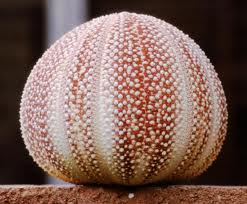
The very basic precedent behind my mouse toy is the idea of a 'spikey' sea urchins that suck back into a ball when touched.
I want to work with this idea as my beginning point starting with the idea of circles that shrink in when touched/hovered over by the mouse.
The circles will then randomly 'pop' back out to full size
As I develop my code I will keep expanding on this idea to add more elements such a color and possibly an action that occurs when you click, this is just the very basic first layer of my design.
The images below show a sea urchin both with spikes out and sucked in as a small example of what I am thinking....
Wednesday, 12 September 2012
Initial Ideas
After reading the brief these are some of my very first ideas (to be very developed) that came to mind ....
Balloons - mouse hovers over them and they fill with air then randomly pop leaving an 'explosion' of more little balloons
kite - mouse is the wind, blows the kite around by the kite flying away from the mouse. Maybe develop a way to change the colour/pattern of the kite
'Metal' wire - wires make up a grid that mouse puts dents by touching it to make different shapes and sculptures.
Sea Urchins - mouse touches one and it 'sucks' in to a small circle then pops back out again
Friday, 24 August 2012
Notes on pictures/screen shots
Unfortunately images put it the setting 'original size' will not show up on the actual blog post so all the screen shots I have used on my blog are slightly stretched as it is the only way they will show up.
Thursday, 23 August 2012
Final Image
This is my final 4 panel all placed together showing the change from structure to noise. My idea is based on the concept of looking at something under a microscope. This is what has inspired my colour pallette as i wanted it to look cold and sterile and artificial (like its in a laboratory). I have also used this idea to inspire how across the board it is as though the 'object' is being more and more zoomed in on as more details can be seen but the form starts to be lost. My form is made by having layers and layers of circles drawn by circles then adjusting the variables like width, height and amount of small circles in each big circle etc
Wednesday, 22 August 2012
Playing with Size
Below is a picture of my final pannel where the only thing i have adjusted is the width and height of the BIG circles (that are made up by the little ones) so that all the layers of circles are the same size. I think it is amazing what a difference it makes, how my 'noise' panel can instantly be turned back into structure with such a straightforward adjustment.
Subscribe to:
Posts (Atom)