Some great points were bought up in tutorial while having a group discussion to try and generate some solid ideas preparing for the interim,
As always the ever present question of what do you do if you reach a road block/ how do you avoid road blocks?
Personally I think this is a huge issue that need addressing in order to separate from a standard GPS or computer system that cant think for itself. How can my app offer different options when the user comes to a road block or better yet, how can it avoid the road block in the first place before it becomes an issue?
Can multipul people use your app/technology at the same time?
i.e cannot light up a building as a way of showing somewhere where to go HOWEVER you can give them technology that lights up the building for their eyes only such a pair of glasses. This is a perfect example of how the most outrages ideas can be made into reality thriugh refinement.
Personally I want to design an app that works for multipul users and as general a group as possibly, ie. at this stage I am not looking at doing anything designe for a specific target audience, eg just females or males.
This tut really made me broaden my thinking of this project to include ideas such as does the app/technology have to be something you operation through your hands or can it be smell, or sound based, the more creative the better!
I now need to start generating/ developing 2-3 solid ideas to find my final one.
Friday, 14 September 2012

Thursday, 13 September 2012
Precedent Image
I decided to develop my 'sea urchin' idea as after consideration to the idea of INTERACTION over CONTROL i think this idea could be developed to have the most unpredictable interaction to create fun.
The very basic precedent behind my mouse toy is the idea of a 'spikey' sea urchins that suck back into a ball when touched.

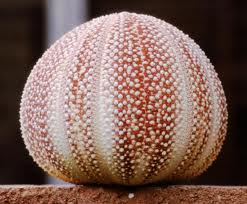
The very basic precedent behind my mouse toy is the idea of a 'spikey' sea urchins that suck back into a ball when touched.
I want to work with this idea as my beginning point starting with the idea of circles that shrink in when touched/hovered over by the mouse.
The circles will then randomly 'pop' back out to full size
As I develop my code I will keep expanding on this idea to add more elements such a color and possibly an action that occurs when you click, this is just the very basic first layer of my design.
The images below show a sea urchin both with spikes out and sucked in as a small example of what I am thinking....
Wednesday, 12 September 2012
Initial Ideas
After reading the brief these are some of my very first ideas (to be very developed) that came to mind ....
Balloons - mouse hovers over them and they fill with air then randomly pop leaving an 'explosion' of more little balloons
kite - mouse is the wind, blows the kite around by the kite flying away from the mouse. Maybe develop a way to change the colour/pattern of the kite
'Metal' wire - wires make up a grid that mouse puts dents by touching it to make different shapes and sculptures.
Sea Urchins - mouse touches one and it 'sucks' in to a small circle then pops back out again
Friday, 24 August 2012
Notes on pictures/screen shots
Unfortunately images put it the setting 'original size' will not show up on the actual blog post so all the screen shots I have used on my blog are slightly stretched as it is the only way they will show up.
Thursday, 23 August 2012
Final Image

This is my final 4 panel all placed together showing the change from structure to noise. My idea is based on the concept of looking at something under a microscope. This is what has inspired my colour pallette as i wanted it to look cold and sterile and artificial (like its in a laboratory). I have also used this idea to inspire how across the board it is as though the 'object' is being more and more zoomed in on as more details can be seen but the form starts to be lost. My form is made by having layers and layers of circles drawn by circles then adjusting the variables like width, height and amount of small circles in each big circle etc
Wednesday, 22 August 2012
Playing with Size
Below is a picture of my final pannel where the only thing i have adjusted is the width and height of the BIG circles (that are made up by the little ones) so that all the layers of circles are the same size. I think it is amazing what a difference it makes, how my 'noise' panel can instantly be turned back into structure with such a straightforward adjustment.


Playing with Stroke
I have experimented with my almost finalized panels by adding a stroke to the outside of some of the circles. I have done this to see what it adds to my design and see if it builds upon the texture or detracts from it.


PANNEL 1 - STROKE

NO STROKE

PANNEL 2 - STROKE

NO STROKE

PANEL 3 - STROKE

NO STROKE

PANEL 4 - STROKE

NO STROKE

This is probably the only panel i am sure that i prefer the stroke on rather than off, without is the background become blurry and appears almost pixelated, the stroke helps to add depth and layering to the 'chaos' emphasizing the idea of structure and noise.
I also like how it fits the idea the 'microscope' zooming in closer to the form so we start to see more detail (i.e the outline of the shapes) but at the same time the symmetrical structure starts to become lost.
I think i would like to slowly bring in a stoke across my panels to build up more of a contrast between pannel one and pannel 4.
Subscribe to:
Posts (Atom)