
Showing posts with label development. Show all posts
Showing posts with label development. Show all posts
Thursday, 25 October 2012
Settings
This is an example of the kind of setting I want my character to walk along on her journey from te aro to kelburn, the setting will be simple but different so she is obviously walking forwards to something. I also wil make them all static so the girl is the only thing moving on the settings making her walk more obvious


My character
I wanted to make the characters I use in my film have a quriky slightly alice in wonderland theme to them to make the kind of theme that my app has.
 This is a picture of my two main characters. I wanted the helper character (the boy) who gives the girl the app to appear as if he could be a student but with a few quirks about him that make him seem unusual - the giant bowtie and hat

Tuesday, 23 October 2012
Painting on people
To develop my idea to draw on live people further i decided to paint my app onto them as well. My film zooms into to show what is happening on the screen of the iphone, this is when the painted people are used. I decided to paint them because my app is made by using real people to show the way, and by making people physically become the app it is literally made by real people.


Here is an example of one of the painted people and the original picture of my app. obviously the people will be simplified as it is very difficult to paint on people!
I also wanted to paint on people to keep my style consistant throughout my app, if i zoomed in and used my original photoshop version I feel as though it is not organic enough to be used with my hand drawn animation
Thursday, 18 October 2012
Final Mouse Toy
These are screen shots from my final code. I a very happy with how it has turned out, I like that it is simple but still engaging and has a very distinct fun/cute vibe to it that attracts the audience to play.
As a whole I think the combination of the simplicity of the interactions, the sound effects, graphics and ideas behind my game create a fun, very easy to use and highly highly addictive application which is exactly the kind of results I was looking to get out of my game.
In one of the first lectures we were asked to consider what the user will learn from our game and if it will still be fun to use once they have learnt it or does it quickly become repetitive and boring? I constantly asked myself this throughout the designing process to make sure that my game kept the user entertained for more than ten seconds.
I think that although it comes clear quite quickly everything my game has to offer, the variation in the interaction (never knowing when they will pop back to full size or what direction the critters will go in) and the fact that it is impossible to get them all small at the same time keeps the user entertained and addicted and it is easy to become mesmerized and keep playing without even really realizing!


As a whole I think the combination of the simplicity of the interactions, the sound effects, graphics and ideas behind my game create a fun, very easy to use and highly highly addictive application which is exactly the kind of results I was looking to get out of my game.
In one of the first lectures we were asked to consider what the user will learn from our game and if it will still be fun to use once they have learnt it or does it quickly become repetitive and boring? I constantly asked myself this throughout the designing process to make sure that my game kept the user entertained for more than ten seconds.
I think that although it comes clear quite quickly everything my game has to offer, the variation in the interaction (never knowing when they will pop back to full size or what direction the critters will go in) and the fact that it is impossible to get them all small at the same time keeps the user entertained and addicted and it is easy to become mesmerized and keep playing without even really realizing!


BIG development
The main thing i didnt like about my idea for the interim storyboard is how I felt it wasn't pushing the boundaries enough, it was to predictable of the style of app i was using that I would go down the animated hand drawn route. To try and break out of the molde i saw myself in I tried to think what it was that most made my app unique, which i concluded was how it relise of the use of other live people, and how could i apply this idea to my film to tie them together.
The idea that came to me was that I wanted to make my film so that is also had a reliance on live people, thus sprang the decision to use real people as the canvas for my film rather than paper. I would hand draw a stop motion animation but make it come to life by drawing it on real people torsos and arms.
The idea that came to me was that I wanted to make my film so that is also had a reliance on live people, thus sprang the decision to use real people as the canvas for my film rather than paper. I would hand draw a stop motion animation but make it come to life by drawing it on real people torsos and arms.
Tuesday, 16 October 2012
Interim Presentation

Although my storyboard/idea only shows one of the features of my app, because it is the main one and the others features such as the 'lead' and 'messages' options are very similar and branch off the same concept, i think it is acceptable that not everything is shown.
Monday, 15 October 2012
Adding Sound
I think because I have minimized the amount of interactions, adding sound as an extra element would be perfect in creating the fun, silly theme I have for my game.
To apply to my underwater theme the sounds I have chosen are a background noise of a sort of submerged recording of lots of bubbles that will play quietly and constantly in my code to set the deep sea mood.
This is the source of the sound I am thinking about using:
http://www.freesound.org/people/digifishmusic/sounds/45521/
The other sound I want to use is to emphasize my main interaction which is the shrinking and re growing of the sea critters. To do this I want to incorporate a cute bubble popping kind of noise for when the critters pop back to full size.
Source to the sound I think I will use:
http://www.freesound.org/people/BMacZero/sounds/96125/
Hopefully sound will give more life to my application and my characters.
To apply to my underwater theme the sounds I have chosen are a background noise of a sort of submerged recording of lots of bubbles that will play quietly and constantly in my code to set the deep sea mood.
This is the source of the sound I am thinking about using:
http://www.freesound.org/people/digifishmusic/sounds/45521/
The other sound I want to use is to emphasize my main interaction which is the shrinking and re growing of the sea critters. To do this I want to incorporate a cute bubble popping kind of noise for when the critters pop back to full size.
Source to the sound I think I will use:
http://www.freesound.org/people/BMacZero/sounds/96125/
Hopefully sound will give more life to my application and my characters.
Thursday, 4 October 2012
Symbols and Sound

This is a screen shot of some of the symbols I am using in my design, the feet and hands replace dots and arrows. I have made this decision because (as i have mentioned before) the main idea of my interface is live/real people. Using little things like hands and feet help to emphasize this point and also fit nicely into the style of my screens.
Unfortunately I couldn't get sound to end up working on my final flash application (though not from lack of trying) which was a real shame as for a small time I had the classic human crowd "ooooo's" and "aaaaaaaah's" going along with the clicking of some of my buttons to give it yet another element of being an application full of life.
Monday, 1 October 2012
Adding Background
Finally got around to adding a photo background into my game, I had already decided on a underwater photo so all I had to do was import it into my code. This turned out to be more difficult that I thought as once the image was in the screen it froze up all the interaction for some reason however managed to get it fixed and love the way it looks, i think having a photo rather than a blue screen really brings about a much more realistic and interesting setting for my game to fill my under the sea aesthetic.


Sunday, 30 September 2012
Final Colour Schemes/ Colour effects
I wanted to try and make it so when the critters popped back to full shape they would change colour however I couldnt get the timing right on my code so instead the colours change randomly every so often.
I actually prefer this as it is much more subtle so it takes awhile for the user to realize that it is happening but it make the critters have a bit more life of there own and stops them from being so static.
I then had to decide on the colour scheme of my code. Originally I wanted to stick to 5 or 6 bright coral colours however by adding the random changing colour element it meant that I ended up getting heaps of colours i didn't want because I had no control over what random colours were selected.
This is a screen shot of when I made the colour range values from 0 to 255 on all RGB meaning there 'random' function had free range to create any colour:


I actually prefer this as it is much more subtle so it takes awhile for the user to realize that it is happening but it make the critters have a bit more life of there own and stops them from being so static.
I then had to decide on the colour scheme of my code. Originally I wanted to stick to 5 or 6 bright coral colours however by adding the random changing colour element it meant that I ended up getting heaps of colours i didn't want because I had no control over what random colours were selected.
This is a screen shot of when I made the colour range values from 0 to 255 on all RGB meaning there 'random' function had free range to create any colour:

Although I do like that the colours emphasize the cartoon like features of my game, i wanted my application to have more of a theme and not seem so random, I thought that this made the features seem less linked.
To fix this I changed my code to a greeney/blue colour scheme that still allowed for a lot of variation but kept to the underwater critters effect from my original idea.
This is the kind of colours that are produced :

I like the way these critters seem to sync with the background and appear to have more of a purpose.
Friday, 28 September 2012
More Style Development

(unfortunately stretched)
This is a screen shot of a development in style I tired using the pictures I found as a loose precedent. Using 'old fashioned' transport as symbols within my design was an idea I considered as the app is about travelling from one place to another however I decided there would probably be enough going on in each frame without using pictures that aren't strictly necessary. I also gave more 'grundgy' layering a go but decided it was to all over the show and un-purposeful. Although I dont want my end design to look crisp and structured I still want it to serve the purpose of highlighting the point of the application.

This is the final style and colour pallet i have decided on to use for my whole flash application. ( I love the way it has a slight circus reference to it - a very people orientated event!) I am happy with the colour pallet choice as I think it is attention grabbing but not because it is overly loud or because it clashes. I also like that it doesn't appear to femminne, which was always a concern of mine as I find my work often appears very obviously female. Because this app is aimed at students I am most happy with how, is this title page is anything to judge off, my app appears fun and easy to use which is all anyone really wants.
Interim Reflection
The main feedback I got from the interim presentation was to make sure I was very critical when its comes to finalizing and refining my work. Because I have so many interactions planned for my final piece I think I will find that many will change or be left behind as I go depending on how effective each one is and what it brings to the game. I have put in a lot of ideas for interactions my game has, however sometimes simple is effective. Overall, my idea seemed to get a good response, i think the 'cute' cartoon factor i proposed is what made it most unique and will be a feature I need to maintain in my final.
Thursday, 27 September 2012
Where to Next?
What will make my application FUN TO USE?
To try and make my app stand out, grab the audiences attention and maintain it I am incorportating a lot of different interactions. Although most of them are very simple because there are so many it should take the user some time to work them all out, plus the user will then want to try out certain actions again and again (eg. exploding one of the sea critters to make lots of little ones) which will keep them enteratined.
The life given to the critters as well should add to the fun element by creating a cute cartoony app has a lot of visual elements such as bright colours for the benefit of the user plain gemoetric shapes and colours, this way it also gives the interactions more meaning. Ie. without the critters there would seem to be no purpose to why they shy away from the mouse.
Next Steps....
Will be to work out how to put a timer on the sucked in critters to get them to randomly pop out again. Also to work out how to make all the circles different colours that possibly change when they bump into one another. Next step will be adding the running away from mouse effect I have on one circle to multiple circles. Once I have all of these effects down I want to start adding the characteristics to my critters; shape, eyes etc. Finally I want to add the shaking into exploding more critters effects to complete my coding.
As I do struggle with code, drawing up a step by step diagram of what to do will be the best option to get down exactly what needs to happen when and how.
To try and make my app stand out, grab the audiences attention and maintain it I am incorportating a lot of different interactions. Although most of them are very simple because there are so many it should take the user some time to work them all out, plus the user will then want to try out certain actions again and again (eg. exploding one of the sea critters to make lots of little ones) which will keep them enteratined.
The life given to the critters as well should add to the fun element by creating a cute cartoony app has a lot of visual elements such as bright colours for the benefit of the user plain gemoetric shapes and colours, this way it also gives the interactions more meaning. Ie. without the critters there would seem to be no purpose to why they shy away from the mouse.
Next Steps....
Will be to work out how to put a timer on the sucked in critters to get them to randomly pop out again. Also to work out how to make all the circles different colours that possibly change when they bump into one another. Next step will be adding the running away from mouse effect I have on one circle to multiple circles. Once I have all of these effects down I want to start adding the characteristics to my critters; shape, eyes etc. Finally I want to add the shaking into exploding more critters effects to complete my coding.
As I do struggle with code, drawing up a step by step diagram of what to do will be the best option to get down exactly what needs to happen when and how.
Colour Scheme and Background
These are a couple of pictures of coral reefs that I want to use as the precedents for my colour scheme. This fits in with the underwater/sea theme of my game but allows me to incorporate much more eye catching colours than the typical blues associated with water.


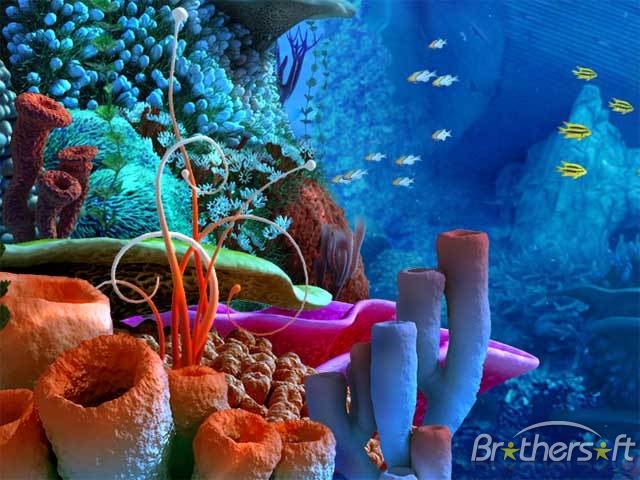
Below is the background I want to use in my sketch. I think using a photo such as this will bring an extra element to the design rather than using a plain blue background. The live photo hopefully will stop the sketch appearing so flat without having to use 3D animation techniques.
I also like that it is a dark blue so I can use bright coral colours such as orange, pink, turquoise and purple as the colours of my sea 'critters'. This way they will really stand out and hopefully create a vibrant and appealing looking game to draw in the user.

Wednesday, 26 September 2012
Run-Away Shrinking Circle
Created a piece of coding where a circle not only shrinks when touched by the mouse but also runs away from the curser so you have to chase it across the page making its a lot more interactive and fun. (unfortunately does not look like much through screen shots)
I now need to translate this code to apply to multiple circles (such as my circle grid) and make them all go off in different directions rather than move as one. Also need to add in boundaries so circles have to come back rather than be chased out of the screen and disappear.
I now need to translate this code to apply to multiple circles (such as my circle grid) and make them all go off in different directions rather than move as one. Also need to add in boundaries so circles have to come back rather than be chased out of the screen and disappear.
Shrinking Circle Grid


This is a grid of circles I created (my first ever attempt at using an aray), where each circle shrinks independently when the mouse hovers over it. As can be seen by the pictures the grid begins with all the circles being the same shape then different patterns can be created by making all the circles different sizes.
The next step will be to develop on this to code to make each circle a different colour and make the circles pop back out to a full sized circle once it has been made a small as possible.
Tuesday, 25 September 2012
Interim Advice and Reflection
I got some great feedback from the interim presentation that should definitely help with development of my idea. One of the best ideas was to further develop my idea of using a points system as an incentive to make people providing the directions rather than following them log on and allow their phones to be tracked. It was mentioned that I could somehow make them relate to vic plus awards which would definitely be a great idea to look into.
Other ideas were to add features such as timers or counters that measure the approx distance your journey will be and the approx it time it should take you. I think this is an excellent way to add more elements into my design.
Finally, the design and style of my design seemed to be liked for its playfulness and almost cartoonish characteristics making it seem fun and lively, however I should try out a few styles before I committ to one as hand drawn and digital translate very differently.
Creating Critters
To bring my application more to life, I want my cicles to start to take on personality and a life of there own to try and loose some of the 'control' element they have quite a lot of at the moment.
To do this I want to transform my circles into sea "critters" - still using sea urchins as a precedent - by adding elements that make them appear more as individual thinking creations rather than programmed reactants.
So far my ideas are...
- add eyes that follow the curser around the screen - this is to induce the idea that the critters are nervous of the mouse.
- have the critters move away from the mouse when it comes close as it they are scared, also makes it unpredictable as to which direction each critter will jump away from the mouse in,
- adjust the shape so that when the critter sucks in it is a circle but when it it fully out it is a unique shape (possibly spikey)
I have found inspiration to develop my critters from http://www.rmx.cz/monsters/
- this is a website for 'processing monsters', I want to adapt some of the code on here such as eyes moving to use in my own design.

Above is a screen shot of some of the monsters found on the monster processing site. I thought this was a good example of how just adding eyes and an interesting body shape already makes them appear more alive and FUN!
Developing Style
This is mock up of what the style of my app would appear like if i stuck to the trend and colour scheme I used in my interim wire frame mock up. Orignially I really like this style for the bright coulours, simplicity and the way it catches your eye however I think I prefered it for my interim as the hand done look it better suited the colours than the perfect rectangles and straight lines that are created when it is translated into digital form, it is to static and I want my design to appear lively and liked through more than a bright colour scheme which is what would happen here.

Colour Scheme and Influence
These are a couple of pictures of images I found on google that represent the kind of STYLE i am now looking to use. The slightly vintage, brightly coloured, flat but layered graphic design is perfect bring an extra element to my interface. I think this style is fun and eye catching because of the colours but also has a simplistic element to it that would makes it very flexible end would be able to be used across a whole range of elements that would come with an navigation app, all the way from menus to maps.
Although I would make some adjustment, I also like many elements of both the colour schemes in these photos, the contrast between pale browns and creme with bright blues and reds creates an aesthetic of livelyness that cannot be ignored - as the main focus of my app is that it relies on live people, it is really important to me to capture a sense of life and movement within my design - I want to go in the complete opposite direction to the setrile 'grey' nature modern technology often has.


Subscribe to:
Posts (Atom)